Call or Whatsapp +254795900573

The question of Kaspersky vs Windows Defender comes up in almost every conversation we have with Kenyan business owners about endpoint security. Windows Defender is already there — free, pre-installed, and automatic. Kaspersky costs money. So why bother?
The answer depends entirely on what your business actually does online. For a Nairobi SME handling M-Pesa till transactions, staff email, client files, and online banking every single day, the gap between these two tools is significant — and the consequences of that gap are measured in breached accounts, locked files, and KES. For a home PC used mainly for social media and document editing, Windows Defender is genuinely adequate.
This guide lays out the honest comparison: what each product scores in independent lab tests, where Kaspersky meaningfully outperforms Defender, and where the free tool is actually enough.
The Short Answer: Which One Should Kenyan Businesses Use?
Before the full breakdown — here’s the direct verdict:
- Windows Defender: Adequate for personal PCs with low-risk browsing habits, minimal banking activity, and a user who keeps Windows up to date.
- Kaspersky: Clearly better for businesses handling financial data, M-Pesa transactions, online banking, staff email with attachments, or any device that stores client information.
The price difference is smaller than most people think. Kaspersky Standard protects 3 devices for roughly KES 3,870/year (under KES 330/month at introductory pricing from Kenyan resellers like Avechi or Glantix). That’s less than a single Nairobi lunch for a year of measurably stronger protection on your three most important devices.
Kaspersky vs Windows Defender: Detection Rates from Independent Labs
The most important number in any antivirus comparison is how reliably it catches threats — not based on marketing claims, but on controlled independent testing.
The two most respected testing labs globally are AV-TEST (Magdeburg, Germany) and AV-Comparatives (Innsbruck, Austria). Both test real products against real malware samples without any vendor involvement in scoring.
AV-TEST April 2026 results (Windows 11):
Both Kaspersky Premium and Microsoft Defender Antivirus scored 6/6 in Protection, 6/6 in Performance, and 6/6 in Usability — the maximum possible score. On paper, that looks like a draw.
The practical difference appears in the detail. AV-Comparatives’ March 2026 Real-World Protection Test returned a 98.5% detection rate for Windows Defender — objectively excellent. Kaspersky, by contrast, scored 100% detection of zero-day attacks in January 2026 AV-TEST testing on both Windows and Android, with no false positives across nearly 14,000 clean files scanned.
In AV-Comparatives’ 2025 Summary Report, Kaspersky received Top-Rated Product status, having achieved Advanced+ level in all seven tests. It additionally received a Gold Award for Malware Protection, a Gold Award for Low False Positives, and a Silver Award for Advanced Threat Protection.
Microsoft Defender earned a range of Advanced+ and Advanced ratings in AV-Comparatives 2025 while remaining tightly integrated into Windows — but it was not awarded Top-Rated Product status, which requires consistent Advanced+ performance across all tests.
What this means in practice for Kenya:
The 1.5-percentage-point gap between Defender’s 98.5% and Kaspersky’s near-100% sounds small. But it translates to approximately 225 additional malicious files per 15,000 samples in independent testing — meaning Defender misses roughly 1 in every 67 threats that Kaspersky catches. For a business processing hundreds of email attachments and downloads per month, those odds matter.
Where Kaspersky Meaningfully Beats Windows Defender
1. Ransomware Protection
Ransomware is the most financially devastating threat facing Kenyan SMEs right now. Kenya’s manufacturing, healthcare, and financial sectors all reported significant ransomware incidents in 2025–2026, and the attacks reaching Nairobi are increasingly sophisticated.
Kaspersky includes a dedicated ransomware protection module that monitors file activity in real time. If any process attempts to encrypt files in bulk — the signature behaviour of ransomware — Kaspersky stops it and rolls back the changes made, restoring files to their pre-attack state. This rollback capability is Kaspersky’s single most important differentiator for business users.
Windows Defender includes Controlled Folder Access — a ransomware mitigation feature — but it is off by default and requires manual activation by the user. Many Kenyan business owners running Windows 10 or 11 have never turned it on, leaving their shared drives and accounting files fully exposed to ransomware encryption.
If you’re using Windows Defender, open Windows Security → Virus & Threat Protection → Ransomware Protection → and toggle Controlled Folder Access on right now. It’s the single most impactful free security improvement most Kenyan Windows users can make in under a minute.
2. Safe Money: Isolated Banking Protection
This is the feature that matters most for Kenyan businesses conducting transactions online. Kaspersky’s Safe Money mode launches an isolated, hardened browser session specifically for banking and payment websites. Inside Safe Money:
- Keyloggers cannot capture what you type
- Screen-capture malware cannot photograph your session
- Man-in-the-browser attacks — where malware injects code into an open banking page — are blocked
- The browser is completely isolated from any other running processes
When a Kenyan business owner opens their KCB, Equity, or Cooperative Bank portal, or accesses M-Pesa Business after installing Kaspersky, Safe Money activates automatically. Nothing in Windows Defender offers this level of transaction-specific protection. SmartScreen (Defender’s equivalent) checks URLs against a blocklist but does not create an isolated browser environment.
For any Nairobi SME processing payments online, Safe Money alone justifies the cost of Kaspersky.
3. Phishing Detection
Kaspersky typically offers more comprehensive web security features than Windows Defender’s SmartScreen. In Kenya, where WhatsApp-distributed phishing links and fake M-Pesa “confirmation” pages are among the most common attack vectors, phishing protection is not a theoretical concern — it’s a daily practical risk.
Kaspersky’s anti-phishing engine checks URLs against a cloud-updated database, analyses page content in real time, and blocks fraudulent forms before the user submits any data. It operates across all browsers, not just Microsoft Edge (where Defender’s SmartScreen is strongest).
4. Vulnerability Scanner and Software Updater
Kaspersky Standard and above includes a vulnerability scanner that checks your installed software for known security gaps and prompts you to apply patches. For a Kenyan business running a mix of Windows software — accounting packages, point-of-sale systems, document editors — unpatched software is one of the most common entry points for attackers.
Windows Defender handles Windows Updates but does not scan or manage third-party software vulnerabilities.
5. Performance Optimiser
Beyond security, Kaspersky includes a performance module that identifies startup slowdowns, unnecessary junk files, and resource-heavy background processes. On older Kenyan business hardware — many SMEs run Core i3 or i5 machines from 2018–2021 — this cleanup can produce noticeable speed improvements alongside the security benefit.

Where Windows Defender Holds Its Own
It’s important to be honest: Windows Defender in 2026 is not the weak, checkbox product it was in 2015. Microsoft has invested substantially in improving it, and for many use cases it’s genuinely sufficient.
Where Defender is strong:
- Zero-cost deployment across all Windows 10/11 devices — no licence management, no renewals, no staff training needed
- Tight OS integration — Defender’s Controlled Folder Access, Windows Firewall, Exploit Guard, and SmartScreen work together in ways third-party tools can’t fully replicate at the OS level
- Automatic updates with Windows Update — Defender’s threat database updates silently with every Windows Update cycle, requiring no user action
- AV-TEST 6/6/6 scores in April 2026 on Protection, Performance, and Usability — confirming it’s a capable baseline product
- No performance overhead from a separate security process — Defender is built into the OS
For users who practise safe browsing habits, keep Windows updated, and rarely download unknown files, Windows Defender remains one of the best free antivirus solutions available.
The critical phrase there is “practise safe browsing habits.” In a business environment — where staff receive phishing emails, download supplier attachments, use shared Wi-Fi on business trips, and access financial portals from multiple devices — “safe browsing habits” cannot be assumed across an entire team.
The US Ban: Does It Affect Kenyan Users?
This is the most common concern we hear, and it deserves a direct answer.
In September 2024, the US Department of Commerce banned the sale and distribution of Kaspersky software in the United States, citing national security concerns related to Kaspersky’s Russian origins. This ban applies only to US territory.
For EU users, there are no regulatory restrictions prohibiting the use of Kaspersky in 2026, and the company relocated its data processing to Switzerland in 2020 and continues to pass independent security audits.
Kenya is not subject to the US ban. Kaspersky is legally sold and actively distributed through authorised Kenyan resellers including Glantix, Avechi, Priscom Computers, and TDK Solutions — all with physical presence in Nairobi’s CBD. Kaspersky’s data processing infrastructure moved to Switzerland in 2020, and its source code has been available for independent audit at transparency centres globally since 2017.
The ban is a geopolitical decision, not a technical one. Kaspersky’s independent lab scores — 100% detection, AV-Comparatives Top-Rated 2025, AV-TEST 6/6/6 April 2026 — are based on technical performance, not political alignment. Kenyan businesses can legally purchase and use Kaspersky without restriction.
Kaspersky Plans and Pricing in Kenya (KES)
Kaspersky offers three tiers, all built on the same underlying security engine:
| Plan | What’s included | ~USD/yr | ~KES/yr | Best for |
|---|---|---|---|---|
| Standard | Antivirus, firewall, Safe Money, ransomware protection, performance optimiser | ~$30 | ~KES 3,870 | Individuals and small businesses needing core protection |
| Plus | Standard + unlimited VPN + password manager | ~$53 | ~KES 6,837 | Staff who work remotely or travel frequently |
| Premium | Plus + identity monitoring + parental controls + priority support | ~$75 | ~KES 9,675 | Businesses with higher identity risk or family households |
USD prices at introductory rates. KES at ~KES 129/USD, June 2026. Local KES prices from Kenyan resellers may vary — Avechi lists Kaspersky Standard 5-user at KES 3,099/year, Kaspersky Plus 5-user at KES 15,999/year. Always verify at point of purchase.
CalvanTech recommendation for Kenyan SMEs: Start with Kaspersky Standard covering 3–5 devices (~KES 3,000–4,000/year from Nairobi resellers). It includes everything a typical Kenyan business needs: the full antivirus engine, Safe Money for banking, ransomware rollback, and the vulnerability scanner. Upgrade to Plus only if staff regularly work on public Wi-Fi and you want the bundled unlimited VPN rather than buying NordVPN or Surfshark separately.
Where to buy in Kenya:
- Online with delivery: Avechi (avechi.co.ke), Jumia Kenya (jumia.co.ke)
- Physical shops, Nairobi CBD: Glantix (BIHI Towers, Moi Avenue), Priscom Computers, TDK Solutions (ships same day)
- You can also purchase directly via kaspersky.com — international card payment, delivered as a digital licence key
👉 Try Kaspersky — Get the Best Antivirus for Kenyan Businesses
Side-by-Side Summary: Kaspersky vs Windows Defender
| Feature | Kaspersky | Windows Defender |
|---|---|---|
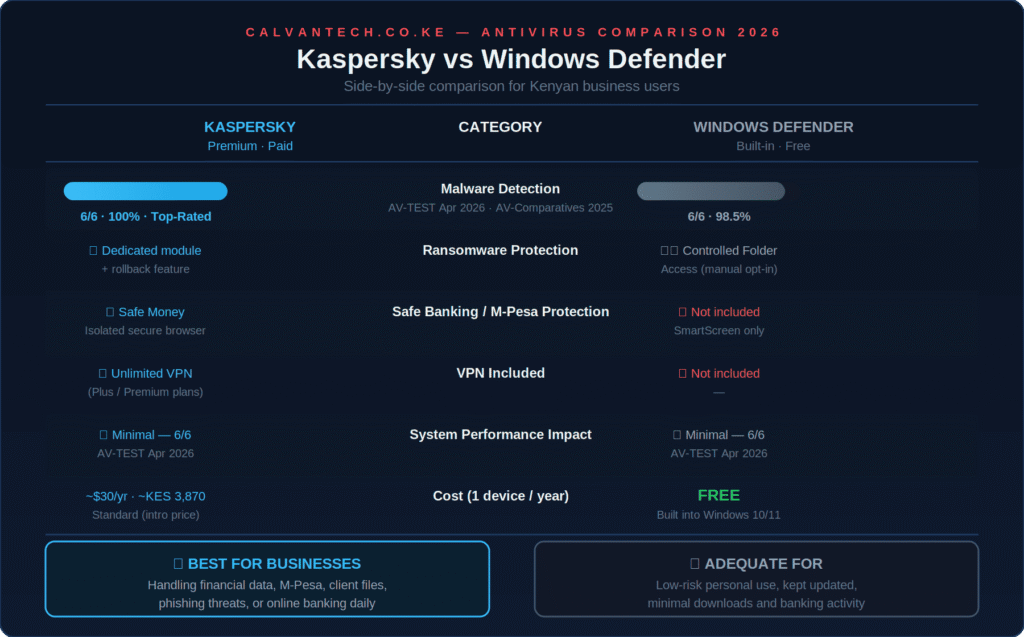
| Malware detection (AV-TEST Apr 2026) | 6/6 — 100% | 6/6 — 98.5% |
| AV-Comparatives 2025 | Top-Rated, Gold awards | Advanced (not Top-Rated) |
| Ransomware protection | ✅ Dedicated module + rollback | ⚠️ Controlled Folder Access (off by default) |
| Safe banking / M-Pesa | ✅ Safe Money isolated browser | ❌ SmartScreen only |
| VPN included | ✅ Plus/Premium plans | ❌ Not included |
| Phishing protection | ✅ All browsers | ⚠️ Edge-first via SmartScreen |
| Vulnerability scanner | ✅ Yes | ❌ No |
| Performance impact | Minimal (6/6 AV-TEST) | Minimal (6/6 AV-TEST) |
| Cost (1 device/yr) | ~KES 1,300–3,200 | Free |
| Kenya availability | ✅ Legal, widely sold | ✅ Built into Windows |
Frequently Asked Questions
Is Windows Defender good enough for a Kenyan business?
For a business PC used primarily for document editing and internal communication, Windows Defender with Controlled Folder Access enabled is an acceptable baseline. For any device regularly accessing M-Pesa, online banking, supplier invoices, or client data — Kaspersky’s Safe Money, stronger phishing detection, and ransomware rollback provide meaningfully better protection at a cost that’s justifiable.
Is Kaspersky safe to use in Kenya after the US ban?
Yes. The US ban applies only within US territory. Kenya has no equivalent restriction, Kaspersky is legally sold here through numerous authorised resellers, and the company’s data processing moved to Switzerland in 2020. Kaspersky continues to pass independent audits from AV-TEST and AV-Comparatives — the two most respected testing labs globally.
Can Kaspersky and Windows Defender run at the same time?
No — and they’re not designed to. Once Kaspersky is installed, Windows Defender usually disables itself automatically to prevent conflicts, and Kaspersky becomes the primary antivirus protection. You don’t need to manually uninstall Defender first.
Which Kaspersky plan is best for a Nairobi small business?
Kaspersky Standard covering 3–5 devices is the practical starting point for most Kenyan SMEs. It includes the core antivirus engine, Safe Money, ransomware protection, and the vulnerability scanner. Upgrade to Plus if you want a bundled unlimited VPN for staff working on public Wi-Fi.
How much does Kaspersky cost in KES?
Prices vary by reseller and plan. Avechi lists Kaspersky Standard 5-user at approximately KES 3,099/year — working out to around KES 620 per device per year, or roughly KES 52 per device per month. At that price, it’s one of the most cost-effective security investments available for Kenyan businesses.
Does Kaspersky protect against M-Pesa fraud?
Kaspersky’s Safe Money feature isolates your browser session when you access banking and payment portals, preventing keyloggers, screen-capture malware, and man-in-the-browser attacks from intercepting your M-Pesa or bank login credentials. While it can’t prevent social engineering (where someone tricks you verbally into sharing your PIN), it does protect the technical attack surface that most M-Pesa fraud exploits.
Final Verdict: Kaspersky vs Windows Defender for Kenya in 2026
Windows Defender is a competent free security baseline. If you’re a home user who keeps Windows updated and practises careful browsing, it’s genuinely enough. No Kenyan user needs to pay for antivirus if their threat exposure is truly minimal.
Kaspersky is the clear recommendation for Kenyan businesses. The AV-Comparatives Top-Rated 2025 status, the Safe Money banking protection that directly addresses Kenya’s M-Pesa fraud risk, the ransomware rollback capability, and the vulnerability scanner add up to a meaningfully stronger security posture. At roughly KES 3,000–4,000 per year from local resellers for up to 5 devices, the per-device cost is lower than almost any other business tool on your computer.
The decision isn’t really Kaspersky vs Windows Defender for business users — it’s whether the specific risks your business faces are worth KES 300 per device per year to address properly.
For most Nairobi SMEs, they are.
👉 Try Kaspersky — Best Antivirus for Kenyan Businesses
Already sorted your antivirus? Protect your internet traffic too — see our NordVPN Review for Kenya and our guide on Signs Your Business Wi-Fi Has Been Hacked.