Call or Whatsapp +254795900573


Disclosure: This post contains affiliate links. If you sign up through one of them, CalvanTech may earn a small commission at no extra cost to you. We only recommend tools we’d genuinely suggest to our own clients.
Is your business WiFi hacked right now — and you simply don’t know it yet? That’s the uncomfortable question every Nairobi business owner should be asking. Most Kenyan SMEs don’t discover a compromised network until something expensive happens: a drained M-Pesa till, a ransom note on the front-desk computer, or a wave of customer complaints about a “fake” version of your website.
Cyberattacks in Kenya aren’t a distant problem anymore. According to KE-CIRT/CC, the government’s national cybersecurity coordination centre, Kenya recorded over 3.3 billion cyber threat events in just the first three months of 2026 — and a staggering 96% of them targeted network infrastructure like routers, servers, and connected devices.
Whether you run a retail shop in the CBD, a small office in Westlands, or manage IT for a school or SACCO, the five warning signs below apply to you. In this guide, we’ll walk through how to spot a hacked business Wi-Fi network, what to do the moment you notice it, and the one tool we recommend every Kenyan business installs today to stop it happening again.
Why Wi-Fi Security Should Be a Priority for Every Kenyan Business
It’s easy to think “we’re too small to be a target.” Unfortunately, that’s exactly why small businesses get hit hardest. Attackers run automated scans across thousands of IP addresses, looking for routers with default passwords, outdated firmware, or open ports. They’re not handpicking victims — they’re casting a wide net, and small offices are the easiest catch.
For a typical Nairobi business, a hacked business Wi-Fi network can mean:
- Customer payment details or M-Pesa transaction screens exposed to anyone snooping on the same connection
- Staff accounts — email, accounting software, POS systems — hijacked and used for fraud
- Ransomware locking your invoices, customer database, or accounting files
- Your bandwidth quietly hijacked for cryptomining or botnet activity, slowing everything down
The good news? Most of these attacks leave clues. Here’s what to look for — and how attackers usually get in to begin with.
How Do Hackers Actually Get Into a Business Wi-Fi Network?
Before we get to the warning signs, it helps to understand the entry points — because most of them can be closed in an afternoon.
Default router passwords. Many ISPs in Kenya install routers with the same admin login on every unit (often something as simple as “admin/admin”). If you’ve never changed yours, the front door has been unlocked since installation day.
Outdated firmware. Routers don’t update themselves. Security flaws in old firmware versions are public knowledge, and automated tools scan for exactly these gaps around the clock.
Weak or widely-shared Wi-Fi passwords. A password written on a sticky note at reception, shared with every supplier, delivery rider, and visiting client, eventually travels further than you’d expect.
“Evil twin” hotspots. In busy areas around Nairobi’s CBD, attackers sometimes broadcast a fake network with a name almost identical to yours — “Office_WiFi” vs. “0ffice_WiFi” — hoping staff connect to the wrong one.
Phishing emails to staff. Once an attacker has one set of staff credentials, they often don’t need to touch your router at all. They can access company systems remotely, using your team’s own logins.
Understanding these entry points makes the next section much easier to act on.
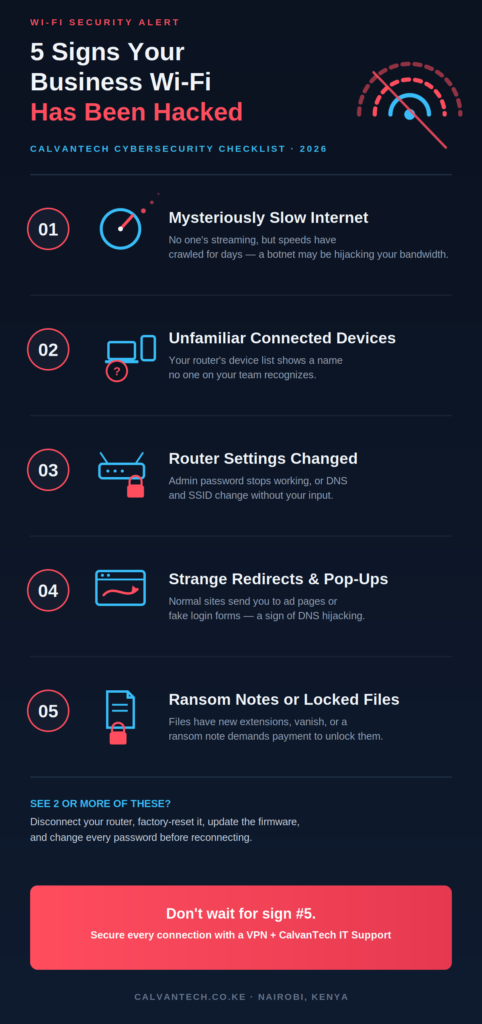
5 Signs Your Business Wi-Fi Has Been Hacked
Here are the five clearest signs that your business Wi-Fi has been hacked, along with a quick check you can run for each one right now.
Sign 1: Your Internet Is Mysteriously Slow — Even When No One’s Streaming
Slow Wi-Fi is the most common complaint in any Kenyan office, which is exactly why it’s the most ignored. But if your connection has been crawling for days with no obvious cause — no one’s on YouTube, no big downloads are running, and your ISP confirms there’s no outage — someone else may be using your bandwidth.
Hacked routers are frequently roped into botnets: networks of compromised devices used to send spam, mine cryptocurrency, or launch attacks on other targets. All of that traffic runs through your connection, eating into the speed you’re paying for. Staff may notice that M-Pesa app transactions, cloud-based POS systems, or video calls suddenly lag for no reason.
Quick check: Run a speed test at a quiet time — early morning before staff arrive — and compare it to the speed your ISP promised. A consistent, unexplained gap is worth investigating further.
Sign 2: Unfamiliar Devices Are Connected to Your Network
Every router has an admin panel listing every connected device — phones, laptops, printers, smart TVs, POS terminals. If you scroll through that list and spot a device name you don’t recognize, or a generic name like “Android-xxxx” that nobody on your team owns, that’s a red flag.
This is especially common in shared office buildings around Nairobi’s CBD, where Wi-Fi signals often bleed between floors and neighboring businesses. Without strong passwords and proper network isolation, “borrowing” Wi-Fi from next door is trivially easy — and so is snooping on it.
Quick check: Log into your router (usually 192.168.1.1 or 192.168.0.1 in a browser), find “Connected Devices” or “DHCP Client List,” and cross-check every entry against the devices your business actually owns.
Sign 3: Your Router Password or Settings Changed Without You Touching Them
This is one of the clearest signs your business Wi-Fi has been hacked. If your admin password suddenly stops working, your Wi-Fi network name (SSID) looks different, or settings like DNS servers and port forwarding have changed — and nobody on your team made those changes — someone else has taken control.
Attackers often change the admin password first, locking the real owner out so they can keep their access undetected. Many Kenyan businesses never change the default password their ISP technician set during installation, which makes this step almost effortless for an attacker.
Quick check: Try logging into your router with the original admin credentials. If they no longer work and you’re certain you haven’t changed them, treat this as an active compromise and move straight to the action steps below.
Sign 4: Websites Redirect You to Strange Pages or Show Excessive Pop-Ups
If typing in a normal website address sends you somewhere completely different — pages full of ads, fake “security warnings,” or unfamiliar login forms — your router’s DNS settings have likely been hijacked.
DNS hijacking is particularly dangerous for businesses that handle online payments. A hijacked connection can quietly redirect staff or customers from a legitimate banking or M-Pesa portal to a near-identical fake one, capturing login details in the process.
Quick check: On a device connected to your business Wi-Fi, visit a well-known site like google.com and confirm it loads correctly without redirects or unusual pop-ups. If something feels off, check your router’s DNS settings against your ISP’s defaults.
Sign 5: You Get Ransomware Messages or Notice Locked, Missing, or Renamed Files
This is the worst-case scenario — and unfortunately, it’s becoming more common in Kenya. Ransomware attacks targeting the manufacturing and SME sectors have surged nationally in recent reporting periods.
If files on a shared drive suddenly have strange new extensions, a ransom note appears demanding payment to “unlock” your data, or important documents have simply vanished, your network has almost certainly been compromised — often through a weak Wi-Fi entry point that went unnoticed for weeks.
Quick check: Don’t pay, and don’t click anything in the ransom note. Disconnect affected devices from the network immediately and get a qualified technician involved before doing anything else.
What to Do Right Now If You Notice These Signs
If one or more of these signs sound familiar, act quickly but calmly. Once you’ve confirmed your business Wi-Fi has been hacked, here’s the order that limits damage fastest:
- Disconnect the router from the internet — unplug the WAN/internet cable — to stop active access without killing your local network entirely.
- Do a full factory reset on your router using the physical reset button. This wipes any malicious configuration changes an attacker made.
- Update the router’s firmware immediately after resetting, since outdated firmware is one of the most common entry points.
- Change every password: the router admin password, your Wi-Fi network password (SSID), and any business accounts — email, banking, M-Pesa till PIN, POS systems — accessed over that network.
- Run a full malware scan on every connected computer, not just the one that seemed affected.
- Bring in professional help if you’re not confident doing this yourself. A compromised business network is not the place to learn on the job — CalvanTech’s IT Support team can assess and clean up a compromised network remotely or on-site anywhere in Nairobi.

How to Secure Your Business Wi-Fi for the Long Term
Fixing an active hack is only half the job. The real win is making sure your business Wi-Fi doesn’t get hacked again. A few habits go a long way:
- Use WPA3 encryption (or WPA2 if your router doesn’t support WPA3) — never leave a network open or running outdated WEP.
- Set a strong, unique Wi-Fi password — at least 12 characters, and never your business name or phone number.
- Disable WPS and remote management on your router unless you specifically need them.
- Create a separate guest network for visitors and customers, completely isolated from your business devices and POS systems.
- Update router firmware regularly — most modern routers can be set to check for updates automatically.
- Review connected devices monthly, not just when something feels wrong.
- Back up critical files to the cloud so a ransomware attack can’t hold your business hostage. CalvanTech’s Cloud Services team can set this up for automatic, secure backups.
If managing all of this sounds like a lot on top of running your business, CalvanTech’s Network Management services cover exactly this — firewall configuration, Wi-Fi management, and ongoing monitoring, so you’re not the one staring at a router admin panel at 11 PM.
Quick Reference: Wi-Fi Security Checklist for Kenyan SMEs
Bookmark this table and run through it once a month.
| Risk Area | Quick Action | Recommended Tool |
|---|---|---|
| Router admin access | Change default password, disable remote management | Router settings (free) |
| Wi-Fi password | 12+ characters, changed every 3–6 months | — |
| Network encryption | Confirm WPA3 or WPA2 is enabled | Router settings (free) |
| Connected devices | Review device list monthly | Router admin panel |
| Firmware | Enable auto-updates or check quarterly | Manufacturer app |
| Traffic encryption (in and out of office) | Encrypt all staff connections, especially remote | NordVPN |
| Device-level malware | Run regular scans on all PCs | Kaspersky |
| Data recovery | Automatic cloud backups | CalvanTech Cloud Services |
Why a VPN Is Your First Line of Defense
Even with a locked-down router, there’s one gap most Kenyan businesses overlook: what happens when staff connect from outside your office Wi-Fi — at a client site, a co-working space, or a café with “free Wi-Fi” that may not be as private as it looks.
This is where a Virtual Private Network (VPN) earns its place. A VPN encrypts your internet traffic in a secure tunnel, so even if someone is snooping on a shared or compromised network, your data — including M-Pesa transactions, emails, and login credentials — stays unreadable to them.
For Kenyan businesses, we recommend NordVPN. A few reasons it stands out:
- Threat Protection automatically blocks malicious websites and trackers — useful if a hijacked DNS or fake hotspot tries to redirect you
- 10 simultaneous device connections per subscription, enough for a small team’s laptops and phones
- Kill switch that cuts your internet instantly if the VPN connection drops, so you’re never accidentally exposed
- Meshnet, which lets remote staff securely access office resources without exposing your network to the open internet
- Servers in 100+ countries, with consistently fast speeds — useful if you work with international clients or suppliers
NordVPN’s longer-term plans bring the cost down to roughly KES 400–450 per month (billed every two years at current exchange rates) — less than a single lunch out, for protection across your whole team’s devices.
👉 Get NordVPN here and start securing your business connections today — wherever your team is working from.
Frequently Asked Questions
How do I know for sure if my business Wi-Fi has been hacked?
Look for a combination of the signs above — especially unexplained slowdowns, unfamiliar connected devices, and changed router settings. One sign alone might have an innocent explanation, but two or more together is a strong indicator your business Wi-Fi has been hacked.
Can a VPN stop my Wi-Fi from being hacked in the first place?
A VPN encrypts the data traveling over your connection, which protects what you send and receive even on a compromised network — but it doesn’t fix a hacked router itself. You still need to secure the router with strong passwords and updated firmware, and use a VPN as an additional layer, especially for staff working outside the office.
What should I do first if I think my business Wi-Fi has been hacked?
Disconnect your router from the internet, then do a factory reset and change all your passwords before reconnecting. If sensitive data — customer information, financial records — may have been exposed, get professional help to assess the damage.
Is free antivirus enough to protect my business network?
Free antivirus helps with malware on individual devices, but it doesn’t protect your router or your network traffic. A layered approach — secured router settings, antivirus on devices, and a VPN for traffic encryption — gives much stronger protection than any single tool alone.
How often should I change my business Wi-Fi password?
At minimum, every 3–6 months, and immediately after any staff member with network access leaves the company, or any time you suspect unauthorized access.
Can I check if my Wi-Fi has been hacked without calling a technician?
Yes — all five checks in this guide (speed test, connected devices list, router login, DNS check, and file integrity) can be done by anyone with basic computer skills in under 30 minutes. If any of them raise concerns, that’s the point to bring in CalvanTech’s IT Support team.
Final Thoughts
A hacked business Wi-Fi network rarely announces itself with flashing red warnings — it shows up as small annoyances that are easy to dismiss. Slower speeds. An unfamiliar device on the network. A router that suddenly won’t accept your password. On their own, any of these could be nothing. Together, they’re worth taking seriously.
The fastest way to reduce your risk is layered protection: a properly secured router, good password habits across your team, and a VPN like NordVPN covering every device — in the office or out of it.
👉 Secure your connections with NordVPN, and if you’d rather have a professional handle the router and network side, reach out to CalvanTech’s IT Support team — we’re based right here in Nairobi and ready to help.