Call or Whatsapp +254795900573


Disclosure: This post contains affiliate links. CalvanTech may earn a commission if you sign up through our links — at no extra cost to you. We only recommend tools we’d deploy for our own clients.
The public Wifi risks in Kenya are real, immediate, and almost entirely invisible to the people experiencing them. Every day, thousands of Nairobi professionals log onto café hotspots, hotel lobby networks, co-working space Wi-Fi, and Safaricom public hotspots — unaware that anything they send or receive on those connections may be visible to anyone else on the same network.
This isn’t a theoretical risk. Kenya’s KE-CIRT/CC coordination centre recorded over 3.3 billion cyber threat events in Q1 2026 alone, with network-level attacks accounting for the majority. Public Wi-Fi is one of the most commonly exploited attack surfaces — precisely because people use it daily without thinking about what it exposes.
This post explains what actually happens to your data on a public network, how cyber criminals exploit those gaps in Nairobi specifically, what Kenyan law says about unauthorised data access, and the single fastest fix that protects you in under two minutes.
What Makes Public Wi-Fi in Nairobi Risky?
Not all Wi-Fi networks are equally exposed. Your home router with WPA3 encryption and a strong, unique password creates a reasonably secure tunnel between your device and the internet. A public Wi-Fi network — the “Free_WiFi_Village_Market” at a Westlands café, or the lobby hotspot at a Karen hotel — typically does not.
Public networks share one connection among dozens or hundreds of users simultaneously. That means your traffic and everyone else’s flows through the same router and the same network segment. Anyone else on that network can, with freely available software, position themselves to intercept unencrypted data passing between your device and the router.
Two specific attack types are most common on Nairobi’s public networks:
Packet sniffing. Tools like Wireshark — free, open-source, and widely used by IT professionals and attackers alike — can capture all data packets passing through a network interface. On an unencrypted public Wi-Fi segment, those packets include login credentials entered into HTTP (not HTTPS) pages, session cookies that grant access to accounts you’re already logged into, and DNS queries that reveal every website you’re visiting.
Evil twin attacks. An attacker creates a fake Wi-Fi network with a name nearly identical to a legitimate one — “Nairobi_Airport_WiFi” instead of “NBO_Airport_WiFi,” for example — and broadcasts it at higher signal strength so nearby devices connect automatically. All traffic then flows directly through the attacker’s device before reaching the internet, giving complete visibility into unencrypted sessions with no obvious sign to the user.
Public Wifi Risks in Kenya: How Attackers Actually Work
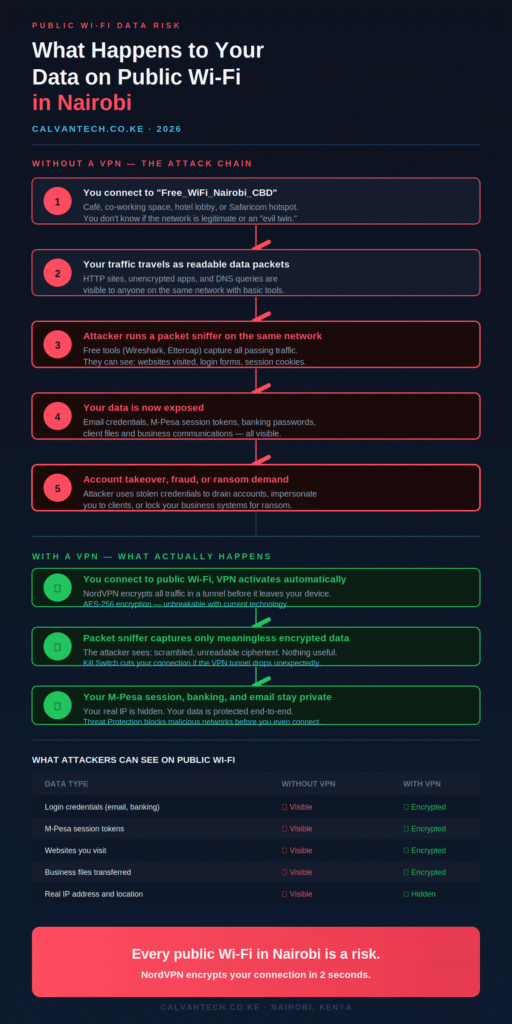
Understanding the mechanics helps explain why the risk is concrete, not hypothetical. Here is the sequence of a typical public Wi-Fi interception in Nairobi’s CBD:
You connect to a café hotspot to check your email and access your accounting platform. Your device begins sending and receiving data over the shared network. An attacker seated nearby, or operating remotely through a rogue access point they’ve set up, runs a passive packet capture on the same network.
If you access any website over plain HTTP rather than HTTPS, every character you type — including usernames, passwords, and form inputs — travels as readable plaintext and is captured in full. If you access HTTPS sites, the payload is encrypted, but metadata (which sites you’re visiting, how often, for how long) remains visible through DNS queries, unless you’re using an encrypted DNS resolver.
Session hijacking is the next step. Even if you logged into your Google Workspace account from home over a secure connection, the session cookie your browser carries — the token that keeps you logged in — can be stolen from an active session over public Wi-Fi and used to access your account from a different device, without needing your password at all.
For a Kenyan business owner accessing M-Pesa Business, online banking, or invoicing software from a public hotspot, this risk is not abstract. A stolen session token from an M-Pesa Business session is a direct path to unauthorised transactions.
Data Misuse in Kenya: What the Law Says
The Computer Misuse and Cybercrimes Act 2018 (CMCA 2018) is the primary Kenyan legislation governing unauthorised access to computer systems and data. Under the Act:
Unauthorised access to computer data — including intercepting network traffic without authorisation — carries criminal liability of up to KES 5 million in fines or up to three years in prison. Unauthorised interception of communications is a specific offence under Section 16, carrying penalties of up to five years.
Data misuse — using intercepted data to commit fraud, impersonation, or financial theft — can result in compounded charges under both the CMCA and Kenya’s Penal Code, with significantly heavier penalties.
The Data Protection Act 2019 adds a parallel layer: any organisation handling personal data of Kenyan residents must take “appropriate technical and organisational measures” to protect it. Using public Wi-Fi without encryption to transmit customer data, financial records, or personal information may constitute a failure of this obligation — putting the business (not just the attacker) in a legally exposed position.
What this means practically: if your staff routinely access business systems over unsecured public networks without protection, the legal authorisation burden sits partly on your organisation. The attacker bears criminal liability for the interception; you bear responsibility for failing to take reasonable precautions with the data you were entrusted to protect.
Who’s Most at Risk in Nairobi?
Public Wi-Fi risks in Kenya aren’t evenly distributed. Certain Nairobi use cases carry significantly higher exposure:
Remote workers and frequent travellers. Staff who work regularly from iHub, Nairobi Garage, Delta Offices, or similar co-working spaces connect to shared networks daily. Even well-managed co-working Wi-Fi is fundamentally a shared network among many users.
Business owners accessing financial tools on the go. Checking M-Pesa Business balances, approving supplier payments, or accessing online banking from a hotspot creates direct financial risk if the session is intercepted.
Sales staff and field teams. Kenyan businesses whose staff spend significant time at client offices, conference venues, or airports — connecting to whatever Wi-Fi is available — create a distributed attack surface that’s difficult to monitor or secure without a device-level solution.
Anyone using hotel Wi-Fi. Hotel networks in Nairobi range from well-secured enterprise infrastructure to cheap residential routers shared among hundreds of guests. Without visibility into how a hotel network is configured, the assumption should be shared and unencrypted.
The Fix: What Actually Protects You
There is no practical way to audit a public Wi-Fi network’s security before connecting to it. You can’t see whether the “Village_Market_WiFi” network you’re joining is the legitimate one or an evil twin. You can’t verify whether the café’s router is patched against known vulnerabilities or running default credentials.
What you can control is your own device. A VPN — specifically one that encrypts all outbound traffic before it leaves your device — makes your data unreadable to anyone on the same network, regardless of whether that network is legitimate or compromised.
When you connect through NordVPN:
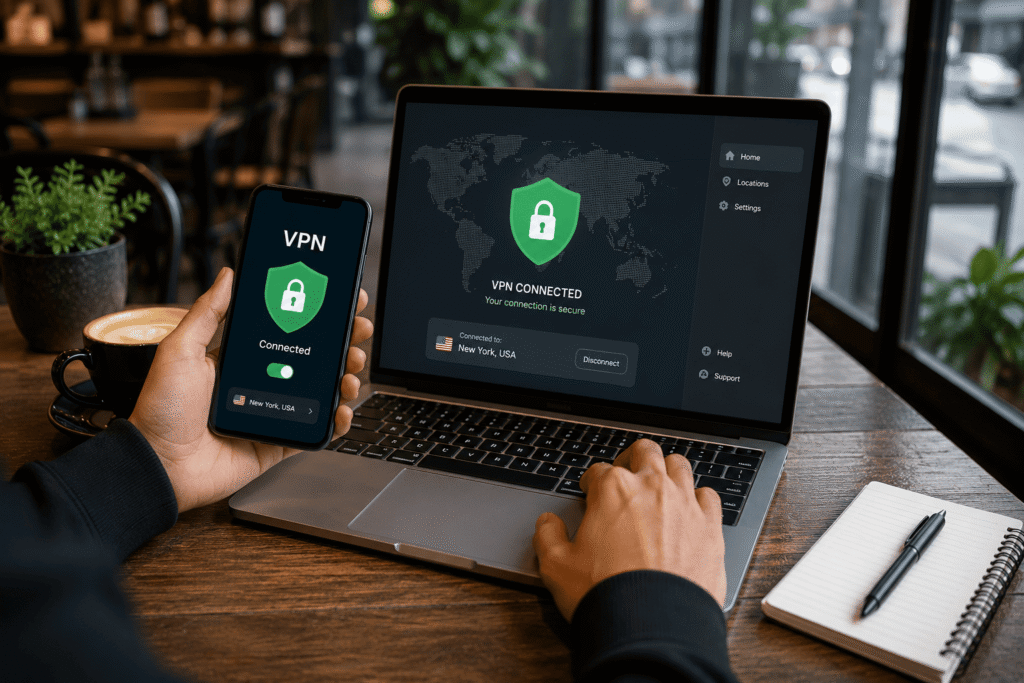
All traffic from your device is encrypted using AES-256-GCM before it reaches the Wi-Fi router — meaning the router, and anyone monitoring the router’s traffic, sees only encrypted data they cannot decode. Your real IP address is replaced by NordVPN’s server IP, hiding your identity and location. NordVPN’s Threat Protection Pro (on Plus plans and above) actively blocks malicious websites and DNS hijacking attempts — relevant in Nairobi environments where DNS-based redirection to fake banking portals has been documented. The Kill Switch cuts your internet connection instantly if the VPN tunnel drops, ensuring you’re never briefly exposed on a public network without protection.
Practical setup for a Nairobi business: each staff member installs NordVPN on their phone and laptop — covered under a single 10-device account — and connects before accessing any business system outside the office. The connection takes two seconds and requires no technical knowledge to operate.
For a full breakdown of features and KES pricing, see our NordVPN Review for Kenya. For the broader question of which VPN is right for your team, see our Best VPN for Kenya comparison.
👉 Get NordVPN — Protect Your Data on Every Network | 30-day money-back guarantee
Frequently Asked Questions
What are the main public Wi-Fi risks in Kenya?
The two most significant risks are packet sniffing (capturing unencrypted data packets on a shared network) and evil twin attacks (fake networks designed to intercept all your traffic). Both are possible on any public Wi-Fi in Nairobi — from café hotspots to hotel lobbies — with freely available tools.
Is using public Wi-Fi in Nairobi illegal?
Using public Wi-Fi is legal. Intercepting other users’ data on a public network without authorisation is illegal under Kenya’s Computer Misuse and Cybercrimes Act 2018, carrying criminal liability of up to five years imprisonment for the attacker. However, the law does not protect you from the technical reality of your data being exposed — it only criminalises the person who intercepts it.
Can M-Pesa be hacked on public Wi-Fi?
M-Pesa itself uses end-to-end encryption for transactions processed through Safaricom’s servers. The risk on public Wi-Fi is specifically to the session: if you access M-Pesa Business through a browser on a shared network, a session token theft could allow an attacker to take over that browser session. Using the official M-Pesa app (which uses its own encrypted connection) reduces this risk; adding a VPN eliminates the network-level exposure entirely.
Does HTTPS protect me on public Wi-Fi?
HTTPS encrypts the content of your communications with websites that support it, which is a meaningful improvement over plain HTTP. It does not protect metadata (which sites you visit, how often), it does not protect apps that use non-HTTPS communication, and it doesn’t protect against evil twin attacks where all your traffic routes through an attacker’s device before reaching the internet. A VPN provides a layer of protection that covers all traffic regardless of whether HTTPS is in use.
Does a VPN slow down my connection on public Wi-Fi?
With NordVPN using the NordLynx protocol, the speed impact is typically under 10% on a stable public Wi-Fi connection. For video calls, cloud applications, and normal browsing, the difference is imperceptible. On slower or congested public hotspots, the impact may be slightly more noticeable — but protection against data interception outweighs a minor speed reduction.
Final Thoughts
The public Wi-Fi risks in Kenya are real, specific, and entirely preventable. Every Safaricom hotspot, every café network in Westlands, every hotel lobby Wi-Fi in Karen carries the same fundamental exposure: your unprotected data is visible to anyone on the same network with basic tools.
The Computer Misuse and Cybercrimes Act criminalises data interception — but criminal liability for the attacker is cold comfort after your M-Pesa Business account has been drained or your client’s data has been exposed.
Two seconds and a VPN subscription changes that picture completely. Connect, encrypt, and stop worrying about what the person at the next table can see.
👉 Get NordVPN — Safe on Every Network in Kenya | 30-day money-back guarantee
Final Thoughts
The public Wi-Fi risks in Kenya are real, specific, and entirely preventable. Every Safaricom hotspot, every café network in Westlands, every hotel lobby Wi-Fi in Karen carries the same fundamental exposure: your unprotected data is visible to anyone on the same network with basic tools.
The Computer Misuse and Cybercrimes Act criminalises data interception — but criminal liability for the attacker is cold comfort after your M-Pesa Business account has been drained or your client’s data has been exposed.
Two seconds and a VPN subscription changes that picture completely. Connect, encrypt, and stop worrying about what the person at the next table can see.
👉 Get NordVPN — Safe on Every Network in Kenya | 30-day money-back guarantee
Other reading: 7 Cybersecurity Mistakes Kenyan SMEs Make · What is a VPN? Why Your Business Needs One · Is Your Business Wi-Fi Safe?
SOURCES
- Kenya Q1 2026 cyber threats (3.3 billion events, KE-CIRT/CC): Techweez — https://techweez.com/2026/05/06/kenya-cyber-threats-q1-2026-report/
- Computer Misuse and Cybercrimes Act 2018 (Kenya) — Sections 16, 22, 38: Kenya Law — https://kenyalaw.org/kl/fileadmin/pdfdownloads/Acts/2018/TheComputerMisuseandCybercrimesAct_No5of2018.pdf
- Data Protection Act 2019 (Kenya) — Section 41 (appropriate measures): Kenya Law — https://kenyalaw.org/kl/fileadmin/pdfdownloads/Acts/2019/TheDataProtectionAct__No24of2019.pdf