
Call or Whatsapp +254795900573
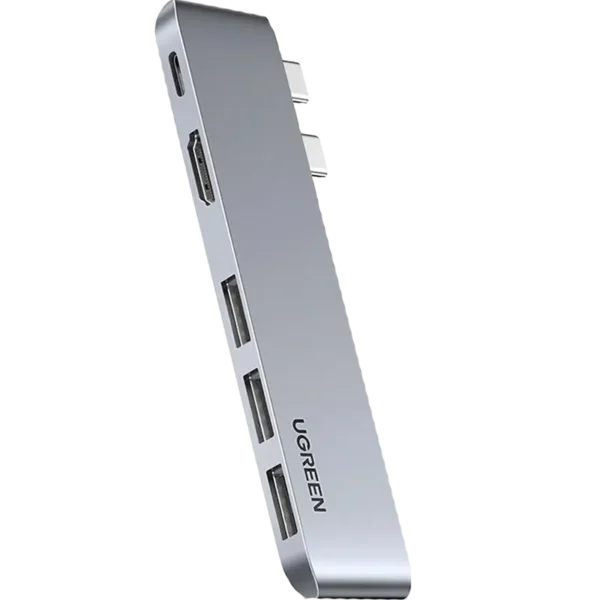
UGREEN CM251 Mac Docking Station
KSh 2,900.00
Specifications
| Specification | Detail |
|---|---|
| Model | UGREEN CM251 (60559) |
| Color | Space Gray |
| Input Connection | 2x USB-C (male) – dual-plug direct insert |
| Output Ports | 3x USB-A 3.0, 1x HDMI, 1x USB-C (female) |
UGREEN CM251 Mac Docking Station
If you own a MacBook, you know the struggle all too well. Apple’s sleek, minimalist design comes at a cost: very few ports. The MacBook Air and MacBook Pro give you just two or four USB-C/Thunderbolt ports, and that’s it. No USB-A for your flash drive. No HDMI for your external monitor. No way to charge and connect peripherals at the same time without constantly swapping cables.
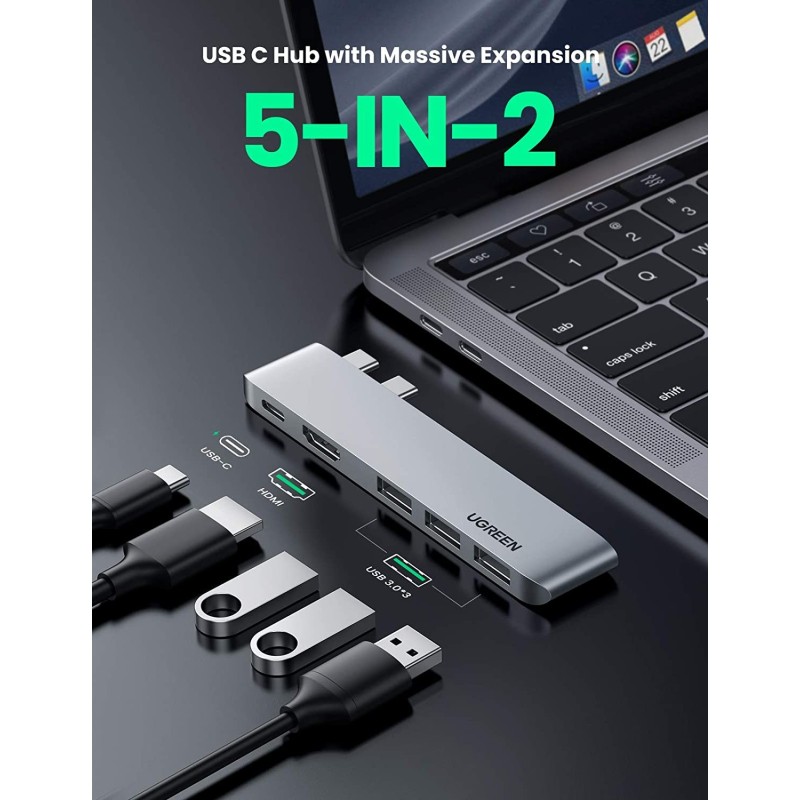
Enter the UGREEN CM251 Mac Docking Station—a brilliant 5-in-2 adapter that turns two USB-C ports into a complete workstation with three USB-A 3.0 ports, 4K HDMI output, and 100W Power Delivery pass-through charging. Designed specifically for MacBook users, this UGREEN Mac docking station plugs directly into your laptop with no cables, no clutter, and no compromises.
At Calvantech, we’re proud to offer the UGREEN CM251 Mac Docking Station to customers across Kenya who demand premium quality and seamless connectivity for their Apple devices.
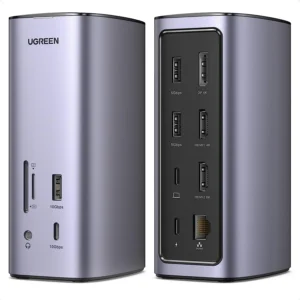
/product/70/4603723/1.jpg?5429 "UGREEN CM251 Mac Docking Station")
2. Why You Need the UGREEN CM251 Mac Docking Station
Let’s be honest—port scarcity on MacBooks is a real pain. Whether you’re using a MacBook Air or MacBook Pro, you’ve probably experienced the frustration of having only two USB-C ports and needing to connect a mouse, external hard drive, flash drive, and HDMI monitor all at once.
The UGREEN CM251 Mac Docking Station solves this problem elegantly. It plugs into two adjacent USB-C ports on the left or right side of your MacBook and instantly gives you:
3x USB-A 3.0 ports at 5 Gbps speeds
1x HDMI output supporting 4K UHD at 3840×2160 @ 30Hz
1x USB-C female port with 100W Power Delivery pass-through charging
What makes the UGREEN CM251 different from other hubs?
Dual-plug direct-insert design – No dangling cables, no mess
Space Grey aluminium alloy – Matches your MacBook perfectly
100W PD pass-through – Charge your MacBook at full speed while using all ports
4K HDMI – Mirror or extend your display in stunning Ultra HD
Plug-and-play – No drivers, no setup, just works
3. Key Features of the UGREEN CM251 Mac Docking Station
3.1 Dual USB-C Direct-Insert Design – No Cables, No Clutter
The UGREEN CM251 Mac Docking Station features a dual USB-C male connector that plugs directly into two adjacent USB-C/Thunderbolt ports on your MacBook. Unlike traditional hubs with trailing cables that create desk clutter, the CM251 sits flush against your laptop. It’s designed to fit both the left side and right side ports of MacBook Pro and MacBook Air models.
Note: The hub requires a flush connection to the MacBook chassis, so it does not fit MacBooks while a protective case is attached.
3.2 Three USB-A 3.0 Ports – 5 Gbps SuperSpeed
The UGREEN CM251 Mac Docking Station gives you three USB-A 3.0 ports with data transfer speeds of up to 5 Gbps. That’s 10 times faster than USB 2.0. Transfer a 4GB movie in seconds, back up hundreds of photos in moments, or connect multiple peripherals simultaneously without slowdowns.
Users consistently report that the aluminium shell stays cool even during 4K video output and heavy USB usage.
3.3 4K HDMI Output – Stunning Ultra HD Display
The built-in HDMI port supports 4K UHD resolution at 3840×2160 @ 30Hz. Whether you’re giving a presentation, editing video, or enjoying a movie, the UGREEN CM251 Mac docking station delivers crisp, vibrant visuals on external monitors, projectors, and TVs.
3.4 100W Power Delivery Pass-Through Charging
One of the standout features of the UGREEN CM251 Mac Docking Station is its 100W Power Delivery pass-through charging. The USB-C female port accepts your existing 67W, 87W, or 96W Apple charger (or any compatible USB-C PD adapter) and passes power through to your MacBook at full speed. This means you can charge your MacBook while using all other ports simultaneously—no more choosing between charging and connecting.
3.5 Premium Space Grey Aluminium Build
The UGREEN CM251 Mac Docking Station is crafted from high-quality Space Grey aluminium alloy that perfectly matches the finish of Apple’s MacBook lineup. The aluminium housing not only looks premium but also helps dissipate heat efficiently during extended use.
3.6 Plug-and-Play – Zero Setup Required
Forget about installing drivers or wrestling with complicated setup processes. The UGREEN CM251 Mac Docking Station is truly plug-and-play. Simply insert the dual USB-C connectors into your MacBook, and it’s ready to use in seconds. No software, no drivers, no configuration.
4. Who Is This UGREEN Mac Docking Station For?
The UGREEN CM251 Mac Docking Station is designed specifically for MacBook users who need more connectivity:
MacBook Pro Users – Expand your 2016–2020 MacBook Pro’s Thunderbolt 3 ports
MacBook Air Users – Get the ports Apple left out on your 2018–2020 MacBook Air
M1/M2/M3/M4 MacBook Owners – The CM251 works with Apple Silicon MacBooks
Video Editors & Creative Professionals – 4K HDMI output and 5 Gbps USB speeds for large media files
Students – Connect projectors for presentations, flash drives for assignments, and charge simultaneously
Remote Workers – Create a productive home office with external monitor, mouse, keyboard, and charging
Corporate Consultants – Move between client offices with a single adapter that handles everything
Software Developers – Connect external monitors, keyboards, and debugging devices without juggling dongles
“I use it on my MacBook Air M1 and it works perfectly.” – User review
5. Compatibility – Designed for MacBooks
The UGREEN CM251 Mac Docking Station is engineered specifically for Apple laptops:
Compatible MacBook Models:
MacBook Pro 2016 (13″ 2x Thunderbolt 3, 13″ 4x Thunderbolt 3, 15″ 4x Thunderbolt 3)
MacBook Pro 2017 (13″ 2x Thunderbolt 3, 13″ 4x Thunderbolt 3, 15″ 4x Thunderbolt 3)
MacBook Pro 2018 (13″ 4x Thunderbolt 3, 15″ 4x Thunderbolt 3)
MacBook Pro 2019 (13″ / 13.3″ / 15″)
MacBook Pro 2020 (13″ / 16″)
MacBook Air 2018 (13″ / 13.3″)
MacBook Air 2019 / 2020 (including M1 variant)
MacBook Air M2 / M3 / M4
Important Compatibility Notes:
The hub plugs into two adjacent USB-C / Thunderbolt 3 or Thunderbolt 4 ports on the left or right side of the laptop
Newer MacBook Pro 14-inch and 16-inch models with three USB-C ports may also work depending on port spacing
The hub does not fit MacBooks while a protective case is attached because the dual plugs need a flush connection to the chassis
6. How to Use the UGREEN CM251 Mac Docking Station
Using the UGREEN CM251 Mac Docking Station couldn’t be simpler:
Insert – Plug the two USB-C male connectors into two adjacent USB-C ports on your MacBook (left or right side)
Connect – Your MacBook now has five additional ports: 3x USB-A, 1x HDMI, and 1x USB-C (for charging)
Plug in your devices – Connect flash drives, external hard drives, keyboards, mice, printers, or any other USB peripherals
Connect your monitor – Plug an HDMI cable into the 4K port for external display
Charge – Connect your USB-C PD charger to the USB-C female port for 100W pass-through charging
That’s it. No drivers. No software. No complicated setup. The UGREEN CM251 Mac docking station turns your MacBook into a full workstation in seconds.
7. Why Buy from Calvantech?
At Calvantech, we’re committed to providing Kenyan customers with genuine, high-quality tech accessories at competitive prices. When you purchase the UGREEN CM251 Mac Docking Station from us, you get:
100% Genuine UGREEN Products – No fakes, no compromises
Competitive Pricing – The best value for your money
Fast Delivery – Across Kenya
Expert Support – Our team is here to help you choose the right accessories
Explore our full range of accessories:
Other UGREEN products you might like:
UGREEN USB-C Hubs & Adapters – Explore our full UGREEN collection
Laptop Accessories – Find everything you need for your setup
8. Conclusion
The UGREEN CM251 Mac Docking Station is the ultimate connectivity solution for MacBook users who refuse to compromise. With its innovative dual-plug direct-insert design, three USB-A 3.0 ports, 4K HDMI output, and 100W Power Delivery pass-through charging, this UGREEN Mac docking station transforms your MacBook into a productivity powerhouse.
Whether you’re a student presenting to a class, a creative editing 4K video, a developer debugging code, or a professional working remotely, the UGREEN CM251 Mac Docking Station delivers the ports you need—without the clutter, without the hassle, and without the compromises.
Ready to unlock your MacBook’s full potential? Order the UGREEN CM251 Mac Docking Station today from Calvantech and experience the difference that genuine UGREEN quality makes.
👉 Shop UGREEN CM251 Mac Docking Station Now
UGREEN CM251 Mac Docking Station Video Review
Have questions about the UGREEN CM251 Mac Docking Station or need help choosing the right accessories? Contact our team at Calvantech – we’re here to help!
External Resources (For Further Reading)
UGREEN Official Website – Learn more about UGREEN’s full product range
USB-IF: USB Specifications – Official USB standards and specifications
Apple Support: MacBook Pro and Air Technical Specifications – Check your MacBook’s port configuration

Reviews
There are no reviews yet.