
Call or Whatsapp +254795900573
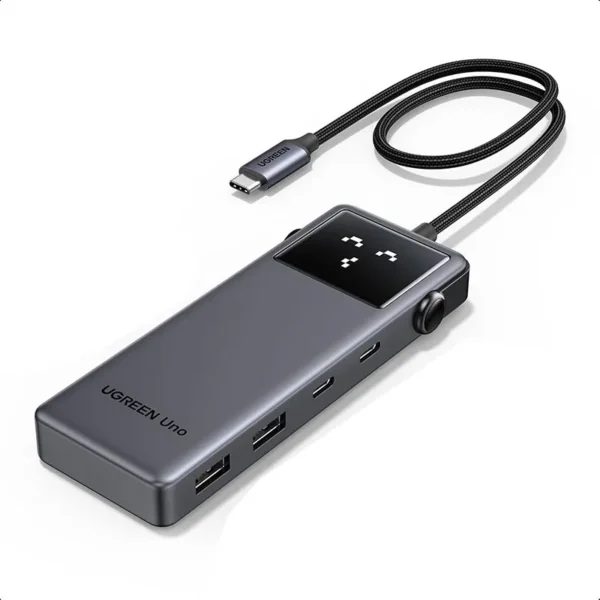
UGREEN CM888 UNO Docking Station
KSh 3,500.00
Specifications
| Specification | Detail |
|---|---|
| Model | UGREEN CM888 (35998) |
| Series | UGREEN Uno Series |
| Color | Space Gray |
| Input Connection | 1x USB-C (male) – built-in braided cable (~25 cm) |
UGREEN CM888 UNO Docking Station
1. Introduction
Modern laptops are thinner, lighter, and more powerful than ever. But there’s one thing they lack: ports. If you own a MacBook, Dell XPS, HP Spectre, or any modern ultrabook, you’ve probably experienced the frustration of having only one or two USB-C ports and nowhere to plug in your USB-A flash drives, external hard drives, or HDMI monitor.
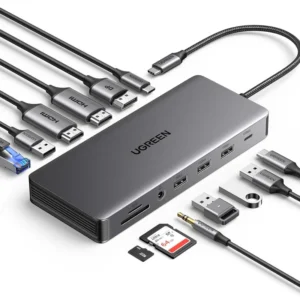
Enter the UGREEN CM888 UNO Docking Station—a game-changing 6-in-1 solution that turns one USB-C port into six blazing-fast connections: two USB-C 3.2 Gen 2 ports, two USB-A 3.2 Gen 2 ports (all at 10 Gbps), 4K@60Hz HDMI output, and 100W Power Delivery pass-through charging. And with its unique robot-inspired design featuring four smart status emojis, this UGREEN UNO docking station is as delightful to use as it is powerful.
At Calvantech, we’re proud to offer the UGREEN CM888 UNO Docking Station to customers across Kenya who demand genuine, high-quality accessories for their daily workflow.
2. Why You Need the UGREEN CM888 UNO Docking Station
Let’s face it—port scarcity is real. Apple’s MacBook Air and Pro come with just two USB-C ports. The Dell XPS 13 has two or three. HP Spectre? Also limited. When you need to connect an external monitor, transfer files from multiple drives, plug in peripherals, and charge your laptop simultaneously, you quickly realize that one or two ports just aren’t enough.
The UGREEN CM888 UNO Docking Station solves this problem instantly. It converts one USB-C port into six powerful connections:
2x USB-C 3.2 Gen 2 ports – 10 Gbps for ultra-fast data transfers
2x USB-A 3.2 Gen 2 ports – 10 Gbps for legacy devices
1x HDMI port – 4K UHD @ 60Hz for stunning visuals
1x USB-C PD port – 100W pass-through charging for your laptop
Key benefits at a glance:
6-in-1 connectivity – 2x USB-C, 2x USB-A, HDMI, and USB-C PD
10 Gbps SuperSpeed+ – Twice as fast as USB 3.2 Gen 1
4K@60Hz HDMI – Ultra-smooth, crystal-clear video
100W Power Delivery – Charge your laptop at full speed
Smart emoji status display – Four expressions for real-time feedback
Groovy robot design – Stands out from boring hubs
Plug-and-play – No drivers, no setup
Premium braided cable – Durable and tangle-resistant
3. Key Features of the UGREEN CM888 UNO Docking Station
3.1 Enter the USB 3.2 Era – 10 Gbps SuperSpeed+
The UGREEN CM888 UNO Docking Station takes data transfer to the next level with USB 3.2 Gen 2 technology. All four data ports—two USB-C and two USB-A—deliver blistering speeds of up to 10 Gbps. That’s twice as fast as USB 3.2 Gen 1 (5 Gbps) and 20 times faster than USB 2.0.
Transfer a 4GB movie in seconds. Back up hundreds of photos in moments. Move massive video files without frustrating delays. The UGREEN CM888 UNO docking station makes waiting for file transfers a thing of the past.
Important: The USB-C ports marked with 10Gbps are for data transmission only and do not support video output.
3.2 4K@60Hz HDMI – Ultra-Smooth, Stunning Visuals
The built-in HDMI 2.0 port on the UGREEN CM888 UNO Docking Station supports 4K UHD resolution at 60Hz. That’s double the frame rate of standard 4K@30Hz hubs, delivering buttery-smooth video for:
Presentations – Crystal-clear slides with zero lag
Video editing – Precision editing at full resolution
Gaming – Fluid gameplay on external monitors
Movie streaming – Cinematic 4K experience
Users consistently report that the UGREEN CM888 delivers flawless 4K@60Hz performance, with one reviewer noting it provided “4k 60fps” when connected to a Steam Deck.
3.3 100W Power Delivery – Charge at Full Speed
The UGREEN CM888 UNO Docking Station features a dedicated USB-C PD 3.0 port that supports up to 100W input, delivering approximately 85W pass-through to your laptop (with ~15W reserved for the hub’s operation). This means you can:
Charge a MacBook Pro 15″ to 100% in about 1.5 hours
Use all other ports simultaneously while charging
Never choose between charging and connecting again
3.4 Groovy Robot Design – Smart Emoji Status Display
What sets the UGREEN CM888 UNO Docking Station apart from every other hub on the market is its unique robot-inspired design. The front panel features four smart status emojis that display real-time information:
😊 Happy – Everything is working perfectly
😐 Neutral – Connected and ready
😴 Sleeping – Standby mode
😢 Sad – Something needs attention
This delightful design makes the UGREEN UNO docking station not just a tool, but a conversation piece for your desk. It’s part of UGREEN’s “Surprise Limited Series” that brings joy to everyday tech.
3.5 Premium Build – Braided Cable and Compact Design
The UGREEN CM888 UNO Docking Station is built to last. It features a durable braided USB-C cable (~25 cm) that resists tangling and wear. The compact design measures approximately 117 × 46 × 16 mm and weighs just 71 g, making it perfect for travel.
3.6 Plug-and-Play – Zero Setup Required
Forget about installing drivers or wrestling with complicated setup processes. The UGREEN CM888 UNO Docking Station is truly plug-and-play. Simply connect it to your device’s USB-C port, and it’s ready to use in seconds. No software, no drivers, no configuration.
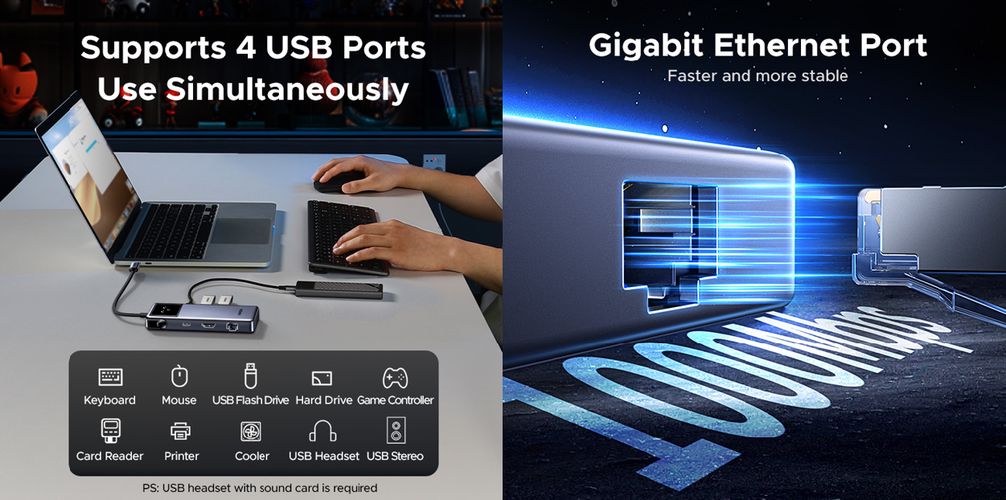
3.7 All Six Ports – Use Simultaneously
The UGREEN CM888 UNO Docking Station allows you to use all six ports at the same time. Connect your 4K monitor, two USB-C drives, two USB-A peripherals, and your charger—all through a single USB-C connection. No more juggling cables or swapping devices.
4. Who Is This UGREEN UNO Docking Station For?
The UGREEN CM888 UNO Docking Station is designed for anyone who needs more connectivity from their USB-C device:
MacBook Users – Expand your MacBook Air or Pro’s limited USB-C ports
Dell XPS & HP Laptop Owners – Connect all your peripherals through a single port
Content Creators – Transfer massive video files at 10 Gbps and edit on a 4K@60Hz monitor
Gamers – Enjoy 4K@60Hz gaming on external displays with low latency
Students – Connect to projectors, transfer files from multiple drives, and charge simultaneously
Remote Workers – Create a productive home office with external monitor, peripherals, and charging
Tech Enthusiasts – Appreciate the unique robot design and smart emoji display
IT Professionals – Service multiple devices with one versatile docking station
5. Compatibility – Works with Almost Everything
The UGREEN CM888 UNO Docking Station offers broad compatibility across a wide range of devices:
Laptops & Computers:
Apple MacBook Pro / MacBook Air (including M1, M2, M3, M4)
Apple MacBook (12-inch)
Dell XPS 13 / XPS 15
HP Spectre / Envy / EliteBook
ASUS ZenBook
Lenovo Yoga / ThinkPad
Microsoft Surface
Chromebooks
Tablets & Smartphones:
iPad Pro / iPad Air
Samsung Galaxy Tab / Galaxy S series
Android smartphones with USB-C
Operating Systems:
Windows
macOS
Linux
ChromeOS
Important Compatibility Notes:
The UGREEN CM888 UNO Docking Station works with any laptop, tablet, or phone whose USB-C port supports DisplayPort Alt Mode video output for HDMI functionality
The USB-C data ports are for data only and do not support video output
The USB-C PD port is for charging only and does not support data or video
6. How to Use the UGREEN CM888 UNO Docking Station
Using the UGREEN CM888 UNO Docking Station couldn’t be simpler:
Connect – Plug the USB-C male connector into your laptop, tablet, or smartphone
Watch the emoji – The smart status display shows a happy face when connected
Expand – Your device now has six additional connections: 2x USB-C, 2x USB-A, 1x HDMI, and 1x USB-C PD
Connect your display – Plug an HDMI cable into the port for 4K@60Hz external display
Connect peripherals – Plug flash drives, external hard drives, keyboards, or mice into the USB ports
Charge – Connect your USB-C PD charger to the PD port for 100W pass-through charging
That’s it. No drivers. No software. No complicated setup. The UGREEN CM888 UNO Docking Station turns your USB-C device into a complete workstation in seconds.

7. Why Buy from Calvantech?
At Calvantech, we’re committed to providing Kenyan customers with genuine, high-quality tech accessories at competitive prices. When you purchase the UGREEN CM888 UNO Docking Station from us, you get:
100% Genuine UGREEN Products – No fakes, no compromises
Competitive Pricing – The best value for your money
Fast Delivery – Across Kenya
Expert Support – Our team is here to help you choose the right accessories
Explore our full range of accessories:
Other UGREEN products you might like:
UGREEN USB-C Hubs & Adapters – Explore our full UGREEN collection
Laptop Accessories – Find everything you need for your setup
8. Conclusion
The UGREEN CM888 UNO Docking Station is the ultimate connectivity solution for anyone who needs more ports from their USB-C device. With its 6-in-1 design featuring two USB-C 3.2 Gen 2 ports, two USB-A 3.2 Gen 2 ports (all at 10 Gbps), 4K@60Hz HDMI output, and 100W Power Delivery pass-through charging, this UGREEN UNO docking station delivers performance that’s twice as fast as standard USB 3.0 hubs.
And with its unique robot-inspired design and smart emoji status display, the UGREEN CM888 isn’t just a tool—it’s a delightful addition to your workspace.
Whether you’re a content creator transferring massive files at 10 Gbps, a gamer enjoying 4K@60Hz gameplay, a student connecting to a projector, or a professional setting up a home office, the UGREEN CM888 UNO Docking Station ensures you’re always connected—with style and without compromise.
Ready to experience the future of connectivity? Order the UGREEN CM888 UNO Docking Station today from Calvantech and experience the difference that genuine UGREEN quality makes.
👉 Shop UGREEN CM888 UNO Docking Station Now
UGREEN CM888 UNO Docking Station Video Review
Have questions about the UGREEN CM888 UNO Docking Station or need help choosing the right accessories? Contact our team at Calvantech – we’re here to help!
External Resources (For Further Reading)
UGREEN Official Website – Learn more about UGREEN’s full product range
USB-IF: USB 3.2 Specifications – Official USB standards and specifications
HDMI.org: HDMI 2.0 Specifications – Official HDMI standard information
Reviews
There are no reviews yet.