Call or Whatsapp +254795900573

WordPress for Kenyan businesses is the practical default for anyone building a website in 2026 — it powers roughly 43% of all websites globally, costs far less than custom development, and scales from a simple brochure site to a full WooCommerce store with M-Pesa checkout. This guide covers hosting, cost, security, and every decision you’ll actually face.
Why WordPress Makes Sense for Kenyan Businesses
WordPress for Kenyan businesses isn’t just a popular choice — it’s the practical one. Globally, WordPress now powers somewhere around 43% of all websites, and roughly 60% of sites that run on any identifiable content management system, according to W3Techs data. That dominance matters for a Kenyan SME specifically because it translates into an enormous local talent pool of developers, thousands of free plugins, and themes built for nearly every industry — meaning you’re never locked into one agency to maintain your site.
The e-commerce side is just as compelling. WooCommerce, the plugin that turns WordPress into an online store, now processes tens of billions of dollars in sales across millions of active stores worldwide. For a Kenyan business, that ecosystem means mature, battle-tested tools already exist for exactly what you need: inventory management, shipping zones, and — critically — mobile money checkout.
Compared to a fully custom-built website, WordPress for Kenyan businesses typically cuts both development time and cost significantly, without sacrificing the ability to scale later. You’re not choosing between “cheap” and “professional” — with the right theme, hosting, and plugin choices, a WordPress site can look and perform identically to a custom build.
WordPress.org vs WordPress.com: Which One Do You Need?
This is the single most common point of confusion for Kenyan business owners starting out, and it’s worth clearing up before anything else.
- WordPress.org (self-hosted) is free, open-source software that you install on hosting you buy separately. You get full control — every plugin, every theme, every line of code is yours to change. This is what nearly every serious business site in Kenya runs on, and it’s what the rest of this guide assumes you’re using.
- WordPress.com is a hosted service where WordPress.org is run for you on Automattic’s servers. It’s simpler to start with, but the free and lower-tier plans restrict plugin installation, custom themes, and monetisation — real limitations for a business that wants a payment gateway or a specific design.
For almost any Kenyan business beyond a personal hobby blog, WordPress.org paired with independent hosting is the right call. It costs a little more upfront (hosting, and possibly a developer), but you’re never boxed in later.
How Much Does a WordPress Website Cost in Kenya?
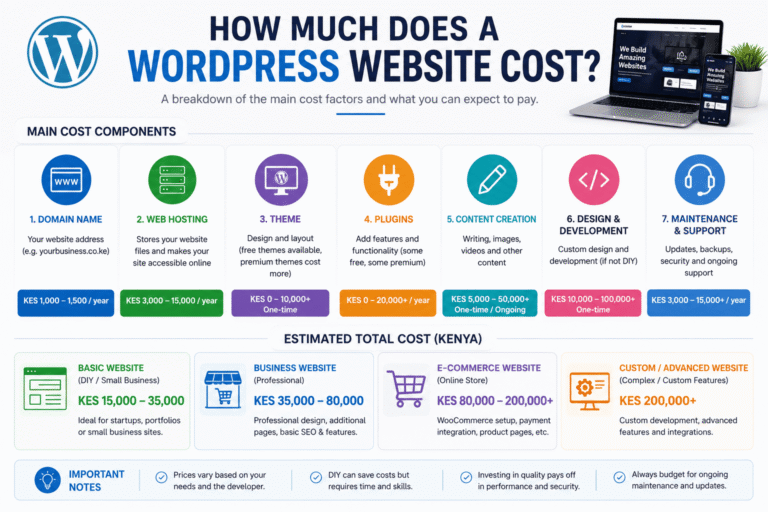
One of the first questions every Kenyan business owner asks is simply: what does this actually cost? Pricing varies enormously depending on scope, but here’s a realistic range for what businesses actually pay in 2026:
- Simple brochure site (5–8 pages, no e-commerce): a few tens of thousands of shillings for a template-based build, more for a fully custom design.
- WooCommerce store (M-Pesa integration, up to ~50 products): budget roughly KES 60,000–90,000 for a basic setup, rising toward KES 130,000+ for a standard store with multiple payment gateways and shipping logic.
- Custom builds with bespoke plugins or complex logic: scoped individually, often starting from KES 130,000 and up depending on requirements.
- Ongoing costs most people forget to budget for: domain renewal, hosting (monthly or annual), a premium theme or page builder license if used, and either a maintenance plan or your own time.
We go much deeper into exact line-item pricing — and how to avoid the common quote-padding tricks some agencies use — in our dedicated WordPress pricing guide (link added once published).
Choosing WordPress Hosting in Kenya
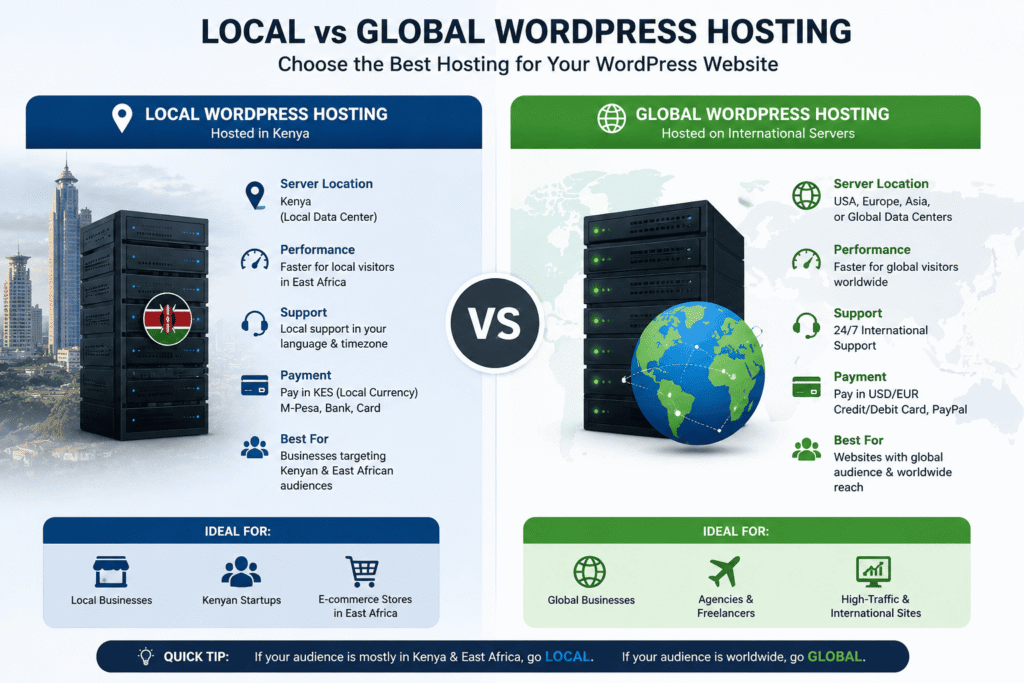
Hosting is the one decision that affects everything else — speed, uptime, security, and ultimately your Google rankings, since page speed is a confirmed ranking factor. When it comes to WordPress hosting in Kenya, businesses generally choose between two paths:
Local Kenyan hosting providers offer the advantage of local billing (often M-Pesa-friendly), local-currency pricing, and support teams in your timezone. They’re a sensible choice for straightforward brochure sites and smaller stores where budget matters more than squeezing out every millisecond of load time.
Global managed WordPress hosts — providers like WP Engine sit in this category — are built specifically for WordPress, with automatic backups, built-in staging environments, and aggressive performance optimisation. The tradeoff is cost (billed in USD) and slightly higher latency to Kenya unless the provider has good CDN coverage. For a business that depends heavily on its site — a busy WooCommerce store, a lead-generation site with real ad spend behind it — the performance and reliability gains are usually worth it. (We’ve reviewed WP Engine in detail here — link to review post.)
One Kenya-specific factor worth building into your hosting decision: the Data Protection Act, 2019 requires businesses handling customer data — which includes basically any site with a contact form, checkout, or newsletter signup — to process that data lawfully and securely, with the Office of the Data Protection Commissioner (ODPC) actively enforcing this through fines that can reach KES 5 million. Where your hosting stores customer data, and how it’s secured, is now a compliance question, not just a technical one.
Building Your Site with Elementor and Page Builders
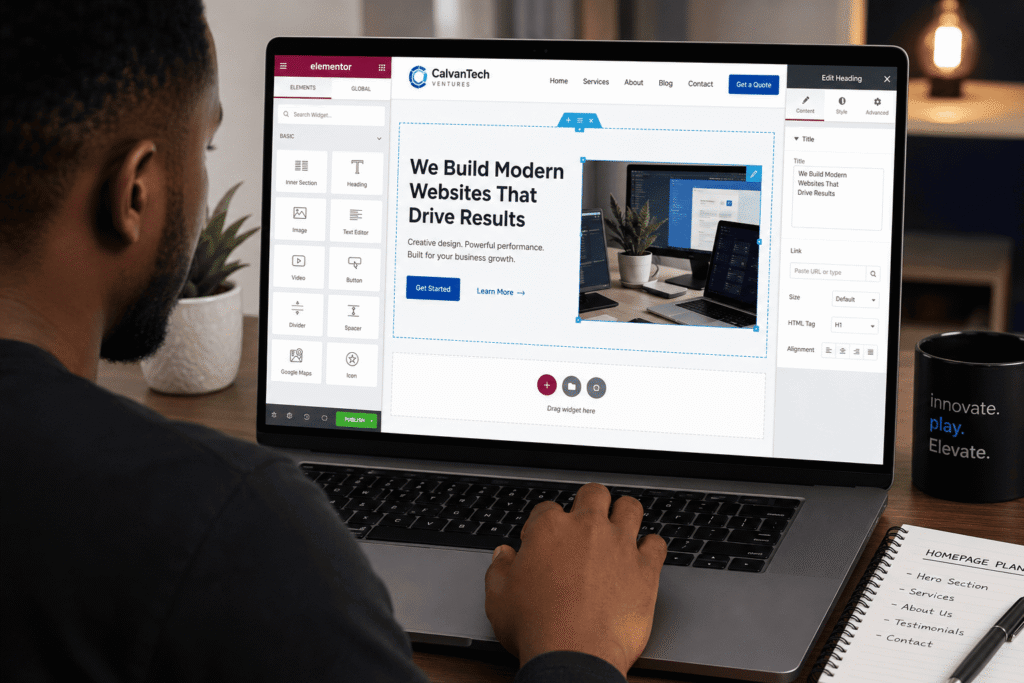
Most WordPress sites built for Kenyan businesses today use a visual page builder rather than hand-coded templates, and Elementor is by far the most widely used. It lets you design pages by dragging and dropping sections, so you can see exactly what a page will look like as you build it — a genuine advantage for business owners who want to make small updates themselves after launch without calling a developer every time.
Page builders pair with a lightweight, well-coded theme (rather than a bloated, feature-heavy one) for the best results — a mismatched combination is one of the most common causes of a slow WordPress site. If your developer suggests a specific theme-and-builder combination, ask them directly why they chose it; a good answer will mention page speed and maintainability, not just visual style.
WooCommerce & M-Pesa: Selling Online in Kenya
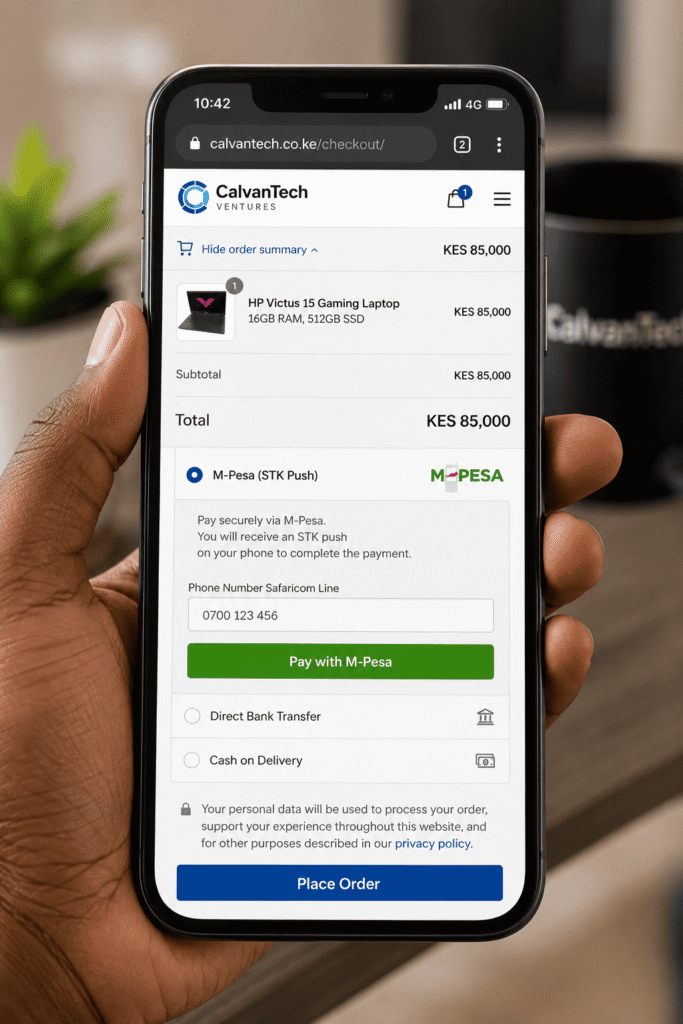
If you’re selling anything online in Kenya, your WordPress site needs to accept M-Pesa — full stop. Card payments alone will cost you the majority of potential customers.
WooCommerce doesn’t include M-Pesa support out of the box, but it connects to it through Safaricom’s Daraja API, either directly (if you have a developer who can build the integration) or through one of several established WooCommerce payment plugins that handle the STK Push flow — the “enter your PIN” prompt customers get on their phone at checkout. A properly built integration should:
- Trigger an STK Push directly at checkout, with no manual confirmation needed on your end
- Update the order status automatically once payment clears
- Support both Paybill and Buy Goods till number setups
- Sit behind a valid SSL certificate — a requirement for handling any payment data, and something Google also flags in Search Console if missing
Beyond payments, WooCommerce handles inventory, shipping zones (useful if you deliver differently within Nairobi vs. upcountry), and product variations — genuinely mature functionality that would take considerable time and budget to replicate with a custom build.
WordPress Security Essentials
WordPress’s popularity is also why it’s a constant target — the sheer number of sites running it makes it worth attackers’ time to look for weaknesses. The essentials that matter most for a Kenyan business site:
- Keep WordPress core, themes, and plugins updated. Most successful attacks exploit known vulnerabilities in outdated software, not sophisticated zero-days.
- Use strong, unique admin credentials and enable two-factor authentication on the login page — a shockingly large share of WordPress compromises still come from simple credential-stuffing attacks.
- Install an SSL certificate (most hosts now include this free via Let’s Encrypt) — non-negotiable if you’re accepting payments or collecting personal data, and a factor in the Data Protection Act obligations mentioned above.
- Run automated, off-site backups so a hack or a bad update can be reversed in minutes rather than becoming an existential crisis for the business.
- Limit login attempts and hide the default /wp-admin login path where practical, to cut down on brute-force traffic hitting your server.
We break this down into a full step-by-step checklist in our WordPress security guide (link added once published). Getting these basics right early is far cheaper than recovering from a breach later — a lesson many Kenyan businesses running on WordPress learn the hard way if they skip it.
Site Speed & Ongoing Maintenance
A WordPress site is not a “build it once” asset — treating it that way is the single most common mistake Kenyan business owners make after launch. Page speed affects both user experience and, directly, your Google rankings through Core Web Vitals. A few high-impact levers:
- Choose quality hosting — this affects speed more than almost anything else you can control.
- Use a caching plugin to serve pre-built pages instead of regenerating them on every visit.
- Compress images before uploading — oversized product photos are the most common cause of a slow WooCommerce store.
- Audit your plugin list regularly — every additional plugin adds some processing overhead, and unused ones are pure risk with no benefit.
A basic monthly maintenance routine — updates, backup verification, a broken-link check, and a security scan — takes a fraction of the time a full recovery from a hacked or crashed site would take. This is worth budgeting for as an ongoing cost, whether you handle it yourself or through a maintenance plan.
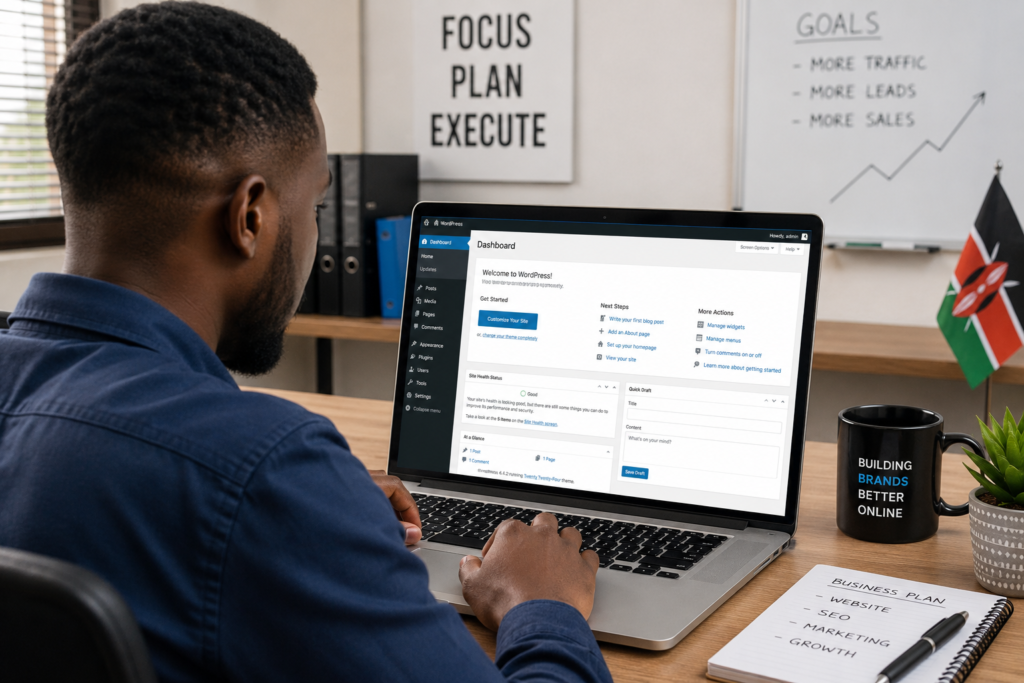
For a business owner without technical time to spare, a simple rule works well: if you can’t remember the last time you logged into your WordPress dashboard, that’s a sign maintenance has already been neglected for too long. Small, regular check-ins prevent the kind of accumulated technical debt that eventually forces an expensive emergency rebuild.
WordPress vs Wix vs Shopify
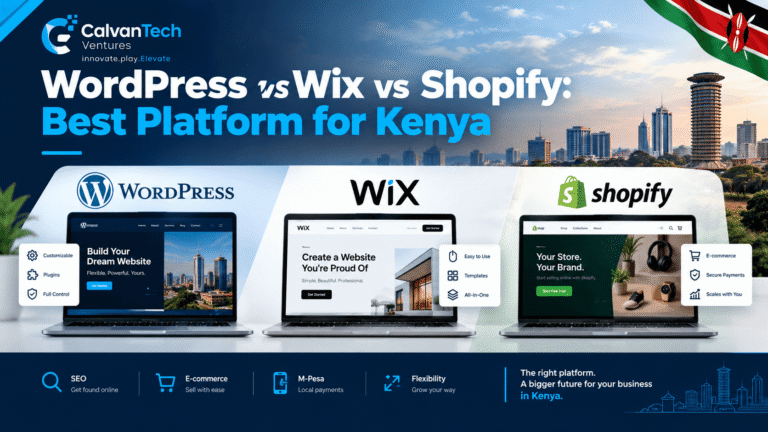
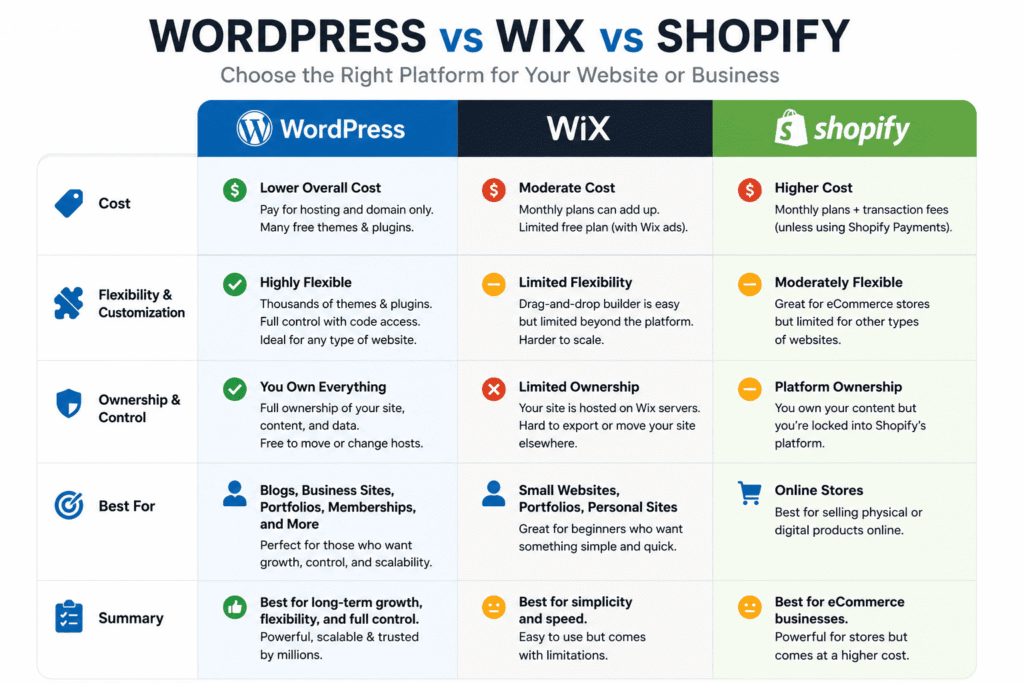
Kenyan businesses researching WordPress inevitably compare it against Wix and Shopify, so it’s worth being direct about the tradeoffs:
- Wix is easier for a complete beginner to get started with, but offers far less flexibility once your needs grow, and migrating away from it later is genuinely difficult since it doesn’t export cleanly.
- Shopify is purpose-built for e-commerce and handles it very well, but comes with a mandatory monthly subscription plus transaction fees on top, which adds up faster than WooCommerce’s model — where you own the software and only pay for hosting.
- WordPress takes slightly more setup effort but wins on long-term cost, ownership, and flexibility — you’re never paying rent on your own website, and you’re never stuck if a platform changes its pricing or policies overnight.
For most Kenyan SMEs planning to be in business for years rather than months, that ownership difference is the deciding factor. It’s also worth noting that switching platforms later — say, from Wix to WordPress once you’ve outgrown it — almost always costs more than starting on the right platform in the first place, since content, SEO rankings, and design usually can’t be carried over cleanly.
Getting Professional Help
If you’d rather have this built and maintained properly than do it yourself, that’s exactly what we do. Check out our web development and IT services or get in touch for a free consultation on your WordPress project.
Frequently Asked Questions
Is WordPress a good choice for a small business in Kenya? Yes. Its low cost of entry, huge plugin ecosystem, and large local developer pool make it the practical default for most Kenyan SMEs, from simple brochure sites to full WooCommerce stores.
How much does a WordPress website cost in Kenya? A simple brochure site can cost a few tens of thousands of shillings, while a WooCommerce store with M-Pesa integration typically runs from around KES 60,000 for a basic setup to KES 130,000+ for a standard store with multiple payment gateways.
Do I need a developer to build a WordPress site, or can I do it myself? Simple sites using page builders like Elementor are genuinely DIY-friendly. Anything involving custom M-Pesa integration, complex WooCommerce logic, or security hardening is worth hiring a developer for.
Can I accept M-Pesa payments on a WordPress site? Yes. WooCommerce connects to Safaricom’s Daraja API — either through a custom integration or an established payment plugin — to trigger STK Push payments directly at checkout.
Is WordPress secure enough for a business website in Kenya? It can be, provided you keep everything updated, use strong login credentials with two-factor authentication, install an SSL certificate, and run regular backups. Most successful attacks exploit outdated software rather than sophisticated new vulnerabilities.
Does Kenya’s Data Protection Act apply to my WordPress website? If your site collects any personal data — through a contact form, checkout, or newsletter signup — you’re processing personal data under the Data Protection Act, 2019, and are expected to handle it lawfully and securely under the ODPC’s oversight.
Should I choose WordPress, Wix, or Shopify for my business? WordPress generally wins on long-term cost and flexibility since you own the software outright. Wix suits quick, simple sites; Shopify suits pure e-commerce businesses willing to pay ongoing subscription and transaction fees for a fully managed experience.
Final Thoughts
WordPress for Kenyan businesses remains the sensible starting point in 2026 — not because it’s trendy, but because the combination of low cost, mature e-commerce tools, M-Pesa-ready payment options, and a deep local talent pool is hard to beat. Get the hosting, security, and maintenance basics right from day one, and the platform will scale with your business rather than becoming something you have to fight against.